Caring for a Famicom
What ages inside. What you can do. Where to call in a specialist.
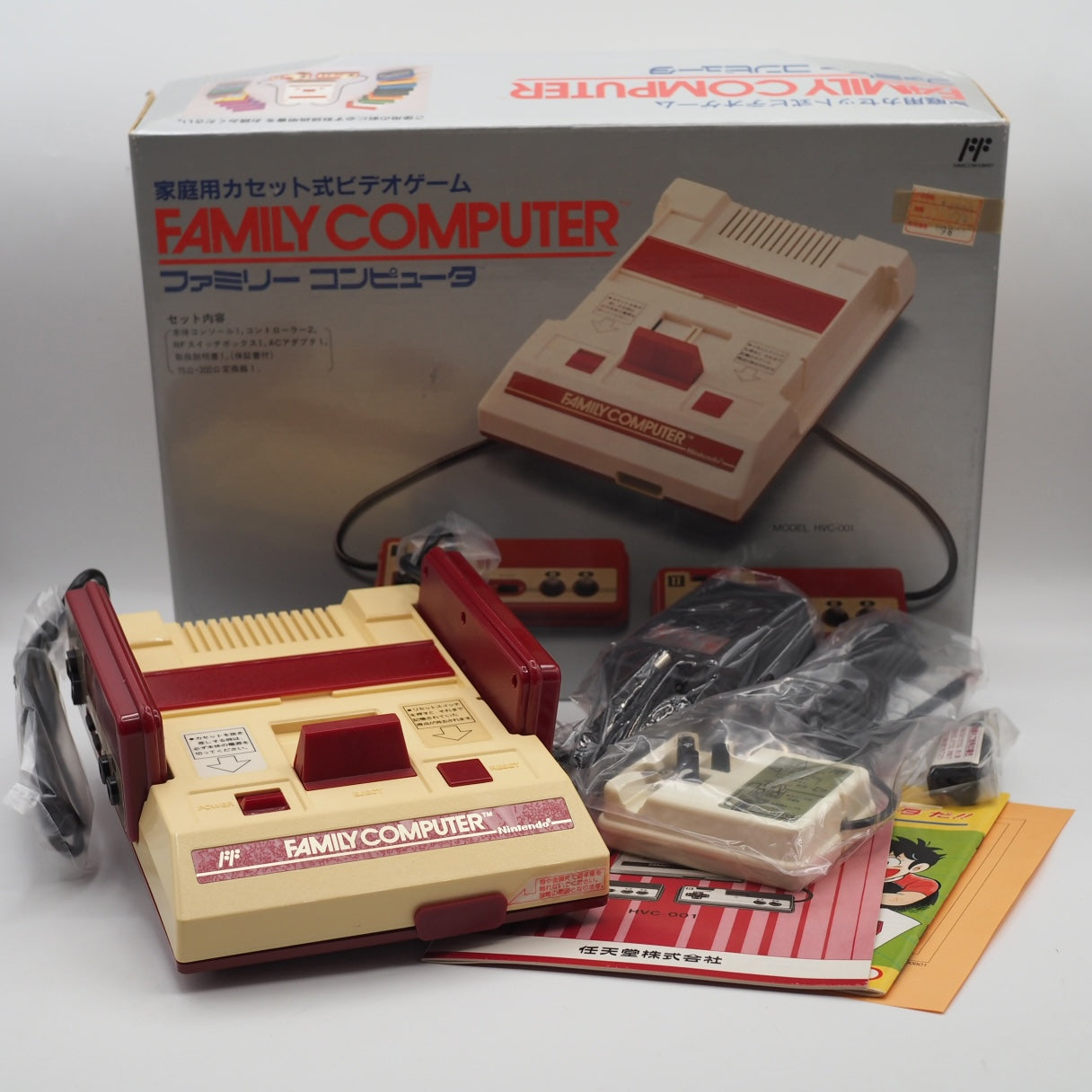 Nintendo Famicom HVC-001 — hand-tested, from our shop
 Getting the right machine was the first step.
This is the second.
A Famicom that has survived forty years was not simply stored in a box. Someone used it, cleaned it, kept it out of the sun, noticed when something seemed wrong. Now it belongs to you — and the same quiet attention that kept it alive is yours to carry forward.
This is not a repair manual. It does not assume you have soldering equipment or a background in electronics. What it does assume is that you care about the machine you have, and that you would rather understand it than be surprised by it.
What ages inside. What you can do. Where to call in a specialist. Three sections, in that order.
Not sure which machine to get yet? Start with the buyer's guide →
What Ages Inside a 40-Year-Old Machine
The parts that were never designed to last forever
Electrolytic capacitors
The original Famicom board contains six electrolytic capacitors. Aluminum electrolytics — the most common type used in consumer electronics of that era — have a chemical lifespan of roughly twenty to thirty years. Every Famicom manufactured in 1983 has long since passed that window.
The deterioration is invisible at first. Rising internal resistance produces symptoms that seem unrelated: audio that sounds slightly off, faint lines across an otherwise clean image, a reset that happens once and never repeats. These are not hardware failures in the dramatic sense. They are a machine speaking in a language most people do not recognize.
By the time the signs are obvious — electrolytic fluid leaking onto the board, a faint chemical smell, copper traces beginning to darken — the damage is no longer minor. A capacitor that looks undamaged from the outside may already be well into its decline. The exterior offers no reliable evidence of what is happening underneath.
Cartridge pins and console slot
Metal contacts oxidize. In the open air, with humidity, over time — this is not a question of whether, only of how much. Forty years of that process produces a layer of oxidation on both the cartridge pins and the console's edge connector that is reliable enough to expect on any unserviced machine.
This oxidation is the single most common reason a Famicom fails to read a game. It is also the area where careful home maintenance makes the most genuine difference.
Controller cables
Unlike the NES, which uses detachable controller connectors, the Famicom's two controllers are hardwired directly into the console. The rubber-insulated cables installed in 1983 are still the cables in use today.
Rubber hardens with age. The point where each cable enters the console housing — a fixed, unavoidable bend — is where stress concentrates. A sharp fold at that junction, repeated over time, is how most Famicom controller cables eventually fail.
Plastic shell
The ABS plastic used in Famicom housings contains brominated flame retardants, a standard safety requirement of the period. Ultraviolet light — from sunlight and fluorescent tubes alike — causes the bromine compounds to oxidize, shifting the plastic from off-white toward amber. This is a chemical change occurring within the material itself, not a surface deposit that cleaning can address.
What is worth knowing: the reaction does not require light to have already started. Some machines have yellowed inside sealed storage, because the process began during or shortly after manufacture and continues at its own pace. Yellowing is aging made visible. It does not indicate neglect, and it does not affect how the machine runs.
Dust and heat
The Famicom has no fan. Ventilation is passive, relying on slots in the housing. Dust that settles onto the circuit board over years of use does not simply sit there — in the presence of humidity, it becomes a mild conductor, gradually accelerating corrosion at solder joints and contacts. Heat compounds this: an aging capacitor that runs warm degrades faster than one that stays cool.
A note on save batteries — and where to find them
A common misconception is worth addressing directly. The Famicom console itself contains no battery of any kind. Save data does not live in the machine.
It lives in the cartridge.
A small number of Famicom games — among them The Legend of Zelda, Metroid, and several RPGs of the late 1980s — store save data using a small lithium battery soldered inside the cartridge housing. When that battery fails, the game can no longer retain saved progress. The console is not involved. The repair is entirely a cartridge-side procedure.
What Good Care Looks Like
What you can do without opening anything
Storage
The environment a Famicom lives in matters more than most people expect.
Aim for a room that stays between 15 and 24 degrees Celsius, with relative humidity in the range of 40 to 50 percent. Basements and attics tend to swing outside both ranges with the seasons, and those swings — more than any single extreme — are what accelerate the aging of plastic, metal, and board materials alike.
For long-term storage, a sealed container with a packet of silica gel reduces the humidity the machine is exposed to between uses. Direct sunlight is the single fastest way to yellow a Famicom shell permanently, and fluorescent lighting contributes over time as well. Indirect, diffused light is the appropriate environment for a machine you want to stay its original color.
Controller cables
Because the cables cannot be detached, the only available care is in how they are handled.
After use, do not coil the cables tightly. The point where each cable meets the console housing is already under slight mechanical stress from the fixed angle; adding a sharp bend at that same point, repeatedly, invites cracking in the rubber insulation. A loose, natural loop — large enough that the cable curves rather than bends — is all this requires.
Exterior cleaning
A microfiber cloth, slightly dampened, with a small amount of diluted dish soap if needed. That is sufficient for the plastic shell, the top surface, and the ventilation slots.
Bleach, abrasive cleaners, and strong solvents will damage ABS plastic — visibly or structurally. Any cleaning solution containing these should not come near the housing. Allow the surface to dry fully before powering the machine on.
Cartridge contacts — the most useful thing you can do at home
Of all the maintenance a collector can perform without specialized tools or training, cleaning cartridge contacts consistently produces the most noticeable results.
Use isopropyl alcohol at a concentration of 91 percent or higher. The 70-percent formulas sold as general-purpose disinfectants contain too much water; that water accelerates exactly the kind of corrosion you are trying to address.
Apply a small amount to a cotton swab. Use a forward-and-back motion along the contact pins — not circular, which can redistribute rather than remove oxidation. Follow with a dry swab to take up any residue. Allow the contacts to sit for at least thirty seconds before inserting the cartridge.
One note on a practice that has circulated for decades: blowing into a cartridge, or into the console slot, is not effective and is not recommended. Nintendo's own guidance has consistently discouraged it. The moisture in exhaled breath does not solve oxidation; it adds humidity to metal contacts that are already prone to it. If a cartridge began loading correctly after being blown on and reinserted, the improvement came from the physical act of removal and reinsertion disturbing the oxide layer — not from the breath.
Power
The Famicom was designed for Japan's 100-volt mains. Its original power supply — the HVC-002 — steps that down to DC 10 volts at 850 milliamps. Running the machine in a country with 120-volt mains, as in North America, without a step-down transformer puts sustained stress on the power supply.
One important caution: the NES and Famicom use entirely different power specifications. An NES adapter outputs AC current; the Famicom requires DC. Using an NES adapter on a Famicom will damage the console. The two are not interchangeable.
The original HVC-002 adapter is now more than forty years old. Power supplies degrade, and an aging original unit may no longer be supplying voltage within its rated tolerance. Testing with a multimeter, or using a correctly specified modern replacement, is worth considering for any machine in regular use.
On yellowing, and bringing the color back
The white and light-grey shells of a Famicom will yellow over time. This is normal — a chemical reaction in the ABS plastic that has nothing to do with how the machine was stored or how well it was cared for. The yellowing does not affect how the console plays. It does, however, affect how it looks, and for a light-colored machine, that matters.
Retrobrighting — a process using hydrogen peroxide and UV exposure — reverses the discoloration and brings the color back toward its original tone. For white and light-grey shells, this is a standard part of caring for the exterior. A console that has been through the process will simply look as it should: clean, even, the color it was made to be. Many of the best-condition machines you will encounter have been through it.
What is worth understanding is that retrobrighting addresses the surface. The bromine compounds responsible for the discoloration remain in the material itself, which means the color may shift again over the years. It is not a permanent solution — it is the kind of care you may return to, the same way you might clean a lens or oil a hinge. Knowing this going in is simply part of knowing the machine.
Where Specialist Work Begins
The difference between care and repair
Good home maintenance — proper storage, gentle cleaning, careful contact work, the right power supply — does more than most people realize. For a machine that is already running well, these habits extend the time before anything more serious is needed.
But there is a line, and recognizing it matters.
Recapping
Replacing the electrolytic capacitors — recapping — is the most common specialist procedure for Famicom restoration. It is also among the most consequential if done incorrectly.
Reversed polarity on an electrolytic capacitor can destroy the board permanently. The work requires temperature-controlled soldering, familiarity with component specifications, and proper electrostatic discharge precautions. These are learnable skills, but they are not beginner work. A board damaged by an incorrect recap cannot be undone.
Internal inspection and board cleaning
To assess a machine's internal condition, someone has to open it. Examining what's there — evaluating capacitor condition, identifying early signs of corrosion, recognizing compromised solder joints, distinguishing cosmetic wear from structural damage — requires experience that photographs and descriptions cannot substitute for.
A machine that runs cleanly, with good video and audio, may still have aging capacitors approaching the point of failure. The only way to know is to look. External condition and internal condition are separate questions, and the exterior answers neither of them.
Cartridge battery replacement
In cartridges that use battery-backed save RAM, the battery is typically spot-welded in place rather than installed in a removable holder. Removing it without disturbing the adjacent components — including the SRAM chip that holds the save data — requires care and the right tools. Incorrect removal risks permanent data loss and component damage.
Common Symptoms & What They Mean
The problems owners meet most often on a machine of this age — and what each one usually points to.
Why won't my Famicom show a picture?
A black screen with no image on a Famicom usually comes down to one of a few ordinary things before anything serious. First make sure a known-good cartridge is fully seated and that the RF or AV connection and the TV channel are correct, since the Famicom outputs over RF and a mistuned channel can look like a dead console. If the power light is on but the screen stays black, the most common real cause on an unserviced machine is an oxidised cartridge slot or dirty cartridge pins, so try the cleaning steps first. If the power light itself will not come on, the power adapter, the 7805 voltage regulator, or the ageing filter capacitors are the likely culprits, and that is soldering work best left to someone experienced.
Why is there no sound from my Famicom?
Silence or distorted audio on a Famicom, when the picture is otherwise fine, most often traces back to the same ageing electrolytic capacitors that affect these forty-year-old boards, or to a poor cartridge contact. Try a different game and re-seat the cartridge first. If several games all sound wrong, with hum, crackle, or muffled audio, that points to the capacitors on the mainboard, which is a repair rather than a home clean. Note that a few Japanese cartridges carry extra sound hardware inside the cartridge itself, so a single game sounding thin is not always the console's fault.
Why won't my Famicom read the cartridge, or why is the screen flashing or garbled?
A flashing screen, a solid colour, or scrambled graphics almost always means the console is not making clean contact with the cartridge. After forty years the console's edge connector and the cartridge's copper pins both oxidise, and that thin layer is the single most common reason a Famicom fails to read a game. Cleaning the cartridge pins and the slot with high-purity isopropyl alcohol resolves the large majority of these cases. Blowing into the cartridge is a myth worth avoiding, since the moisture in your breath speeds up the very corrosion you are trying to remove.
Silencing a noisy Player-2 controller
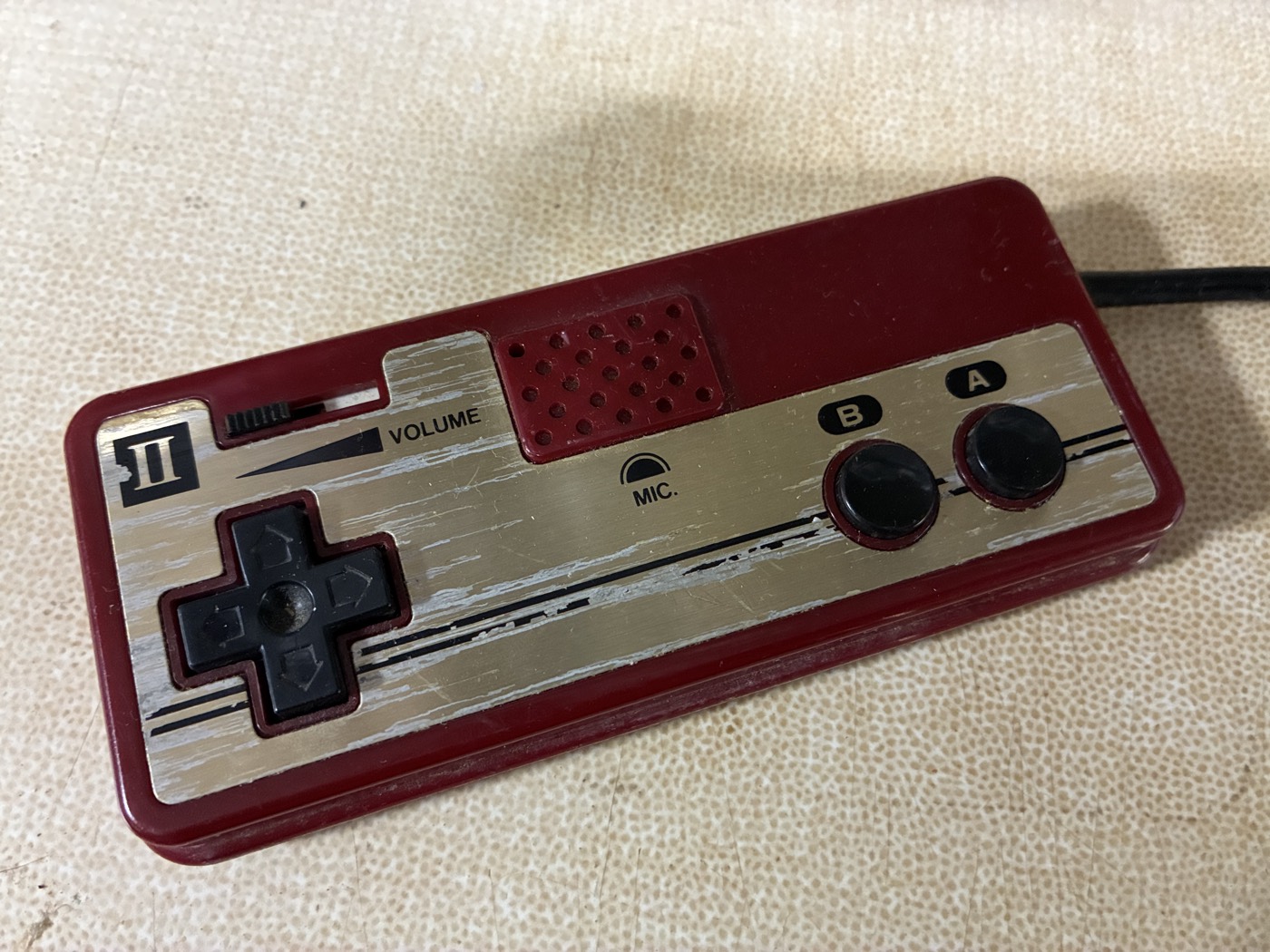
The Famicom's Player-2 controller is the odd one — it has a microphone and a volume slider where Start and Select would be. When a Famicom, or a Twin Famicom, develops a faint noise in its sound, this little controller is a common cause. Here is how I quiet it on the bench.
-
 1
1 This is the controller to suspect: the Player-2 pad, with a microphone and a volume slider in place of Start and Select.
-
 2
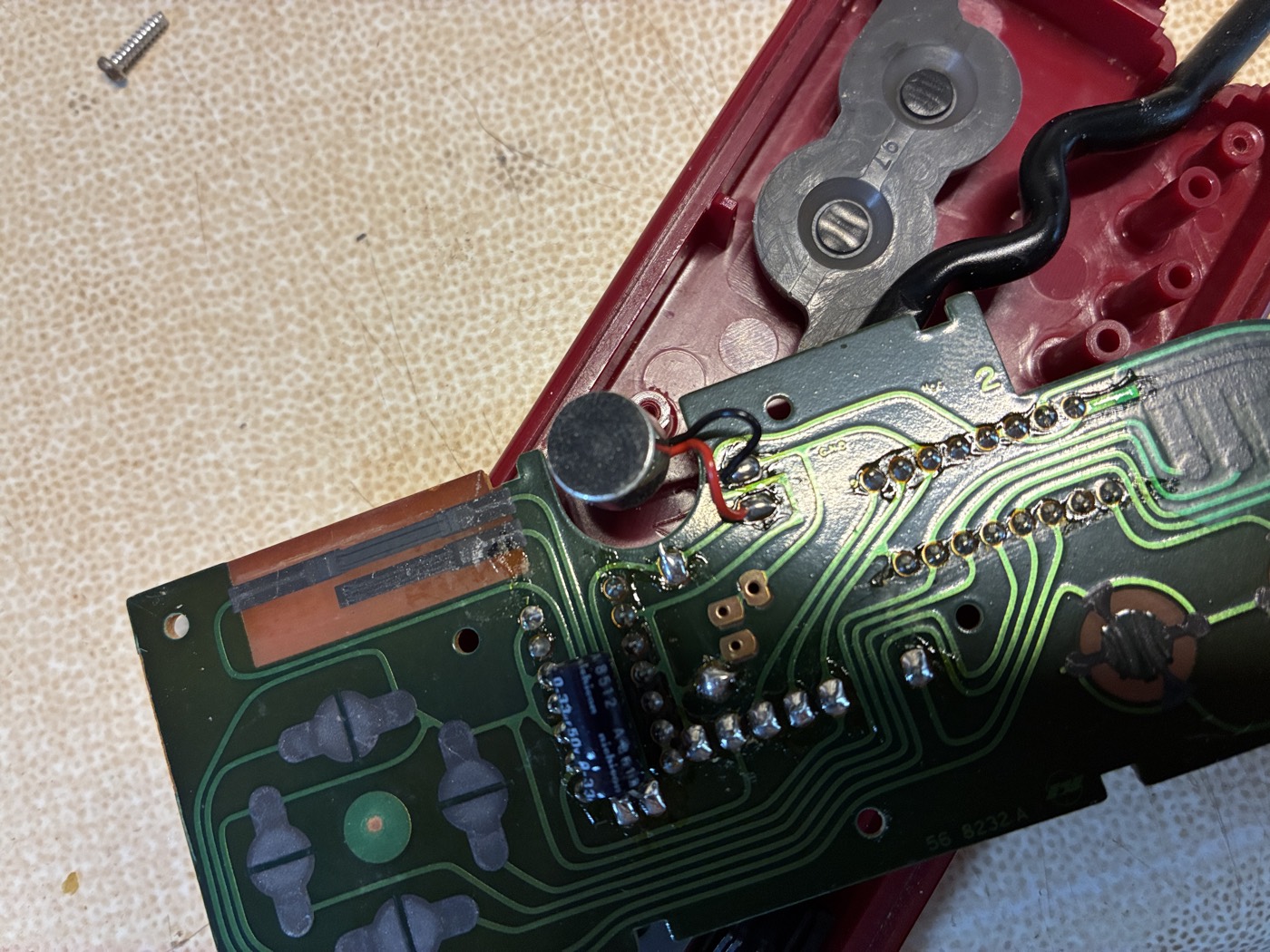
2 Open it and you meet the microphone — the small silver cylinder — with two fine lead wires running to the board, and the volume slide switch beside it.
-
 3
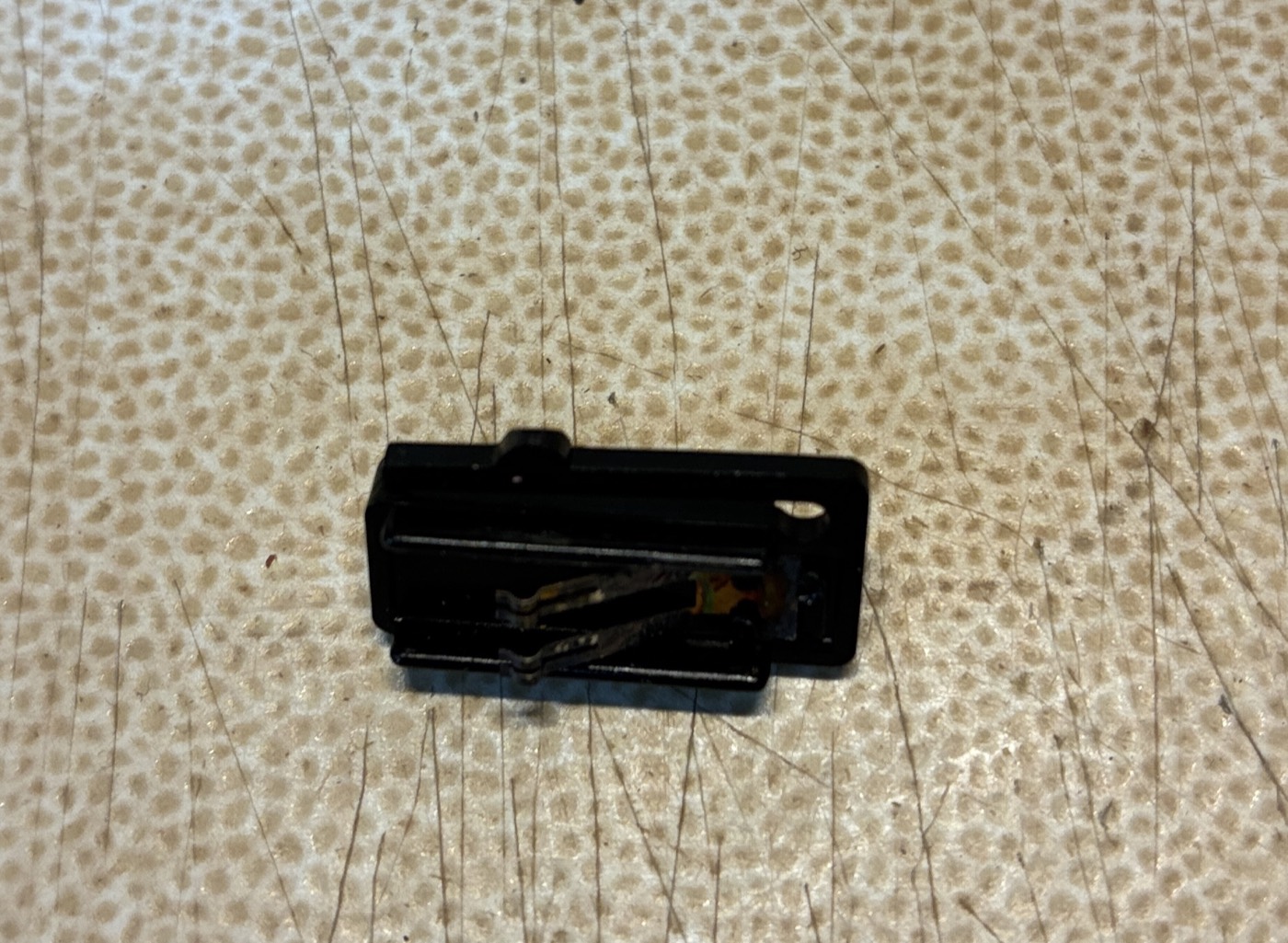
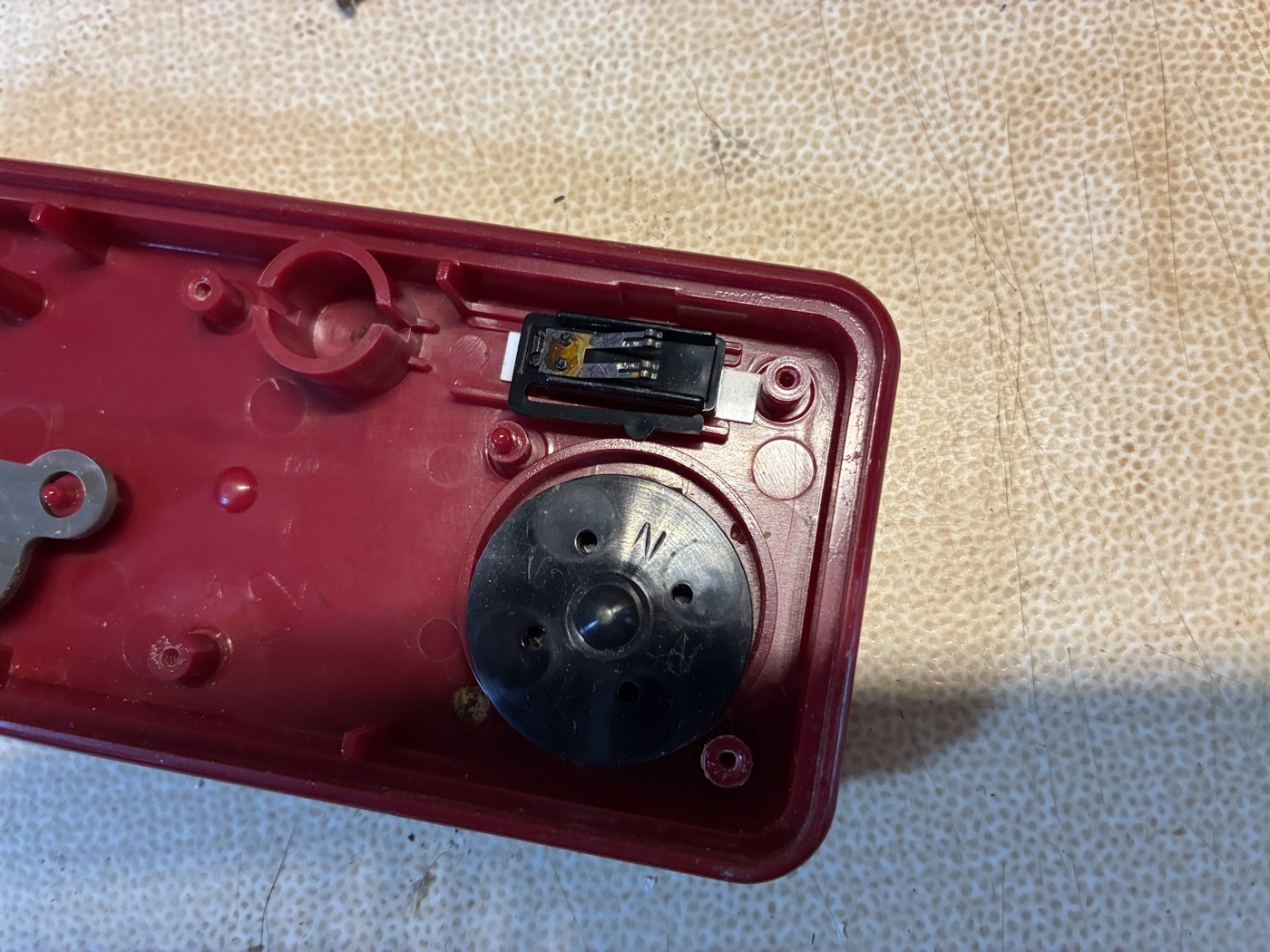
3 The trouble usually lives in that volume slide switch. Over the decades its internal metal contacts oxidise and no longer meet cleanly — a poor contact — and that is what you hear as noise in the game's sound.
-
 4
4 Here is the same switch, seated beside the microphone element inside the shell.
-
 5
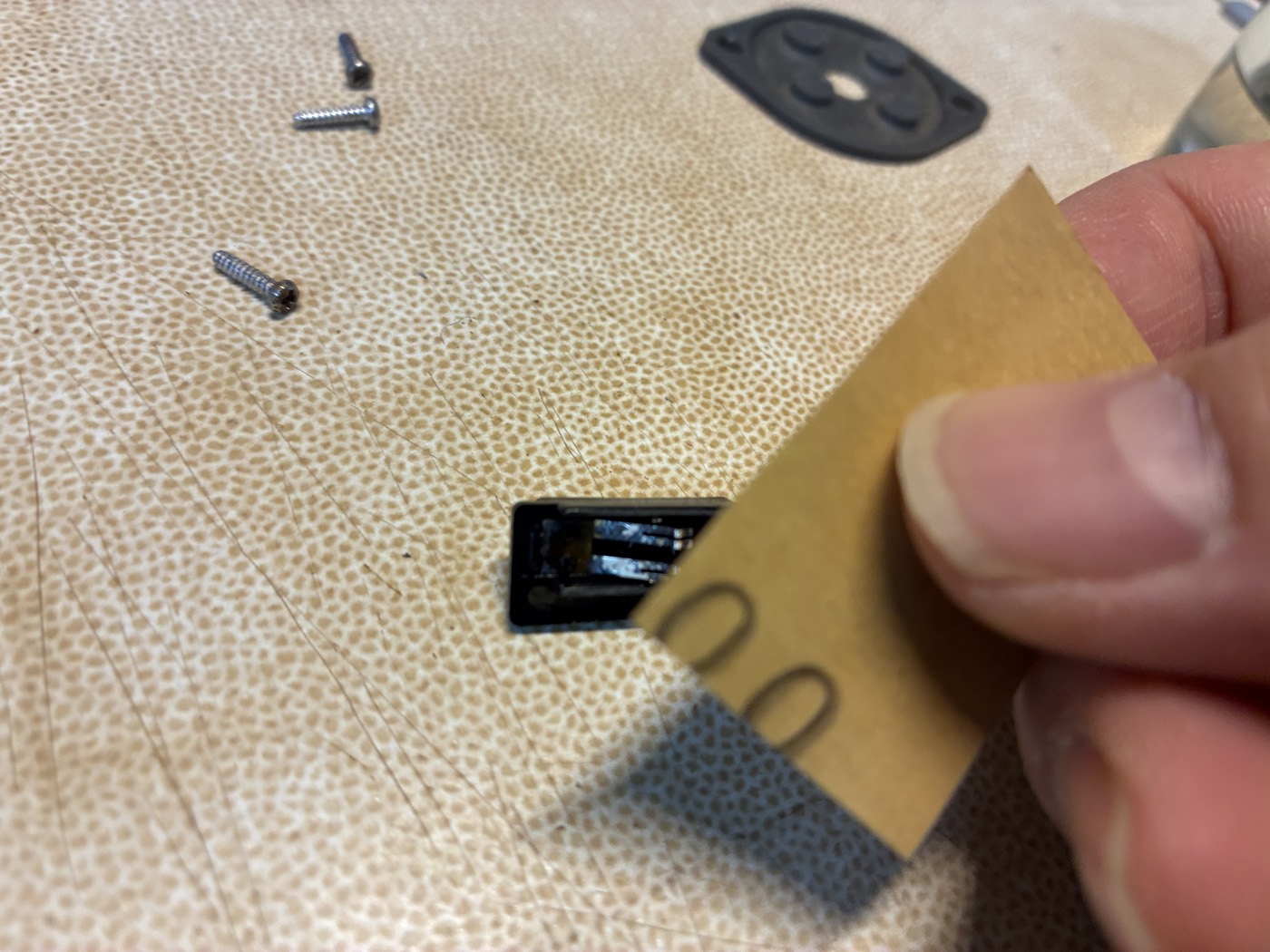
5 I clean it two ways. First I pass fine-grit sandpaper lightly over the contact surface to lift off the oxide. Then I gently raise the metal contact leaf — the springy strip that has to press to complete the connection — so it seats firmly again.
-
 6
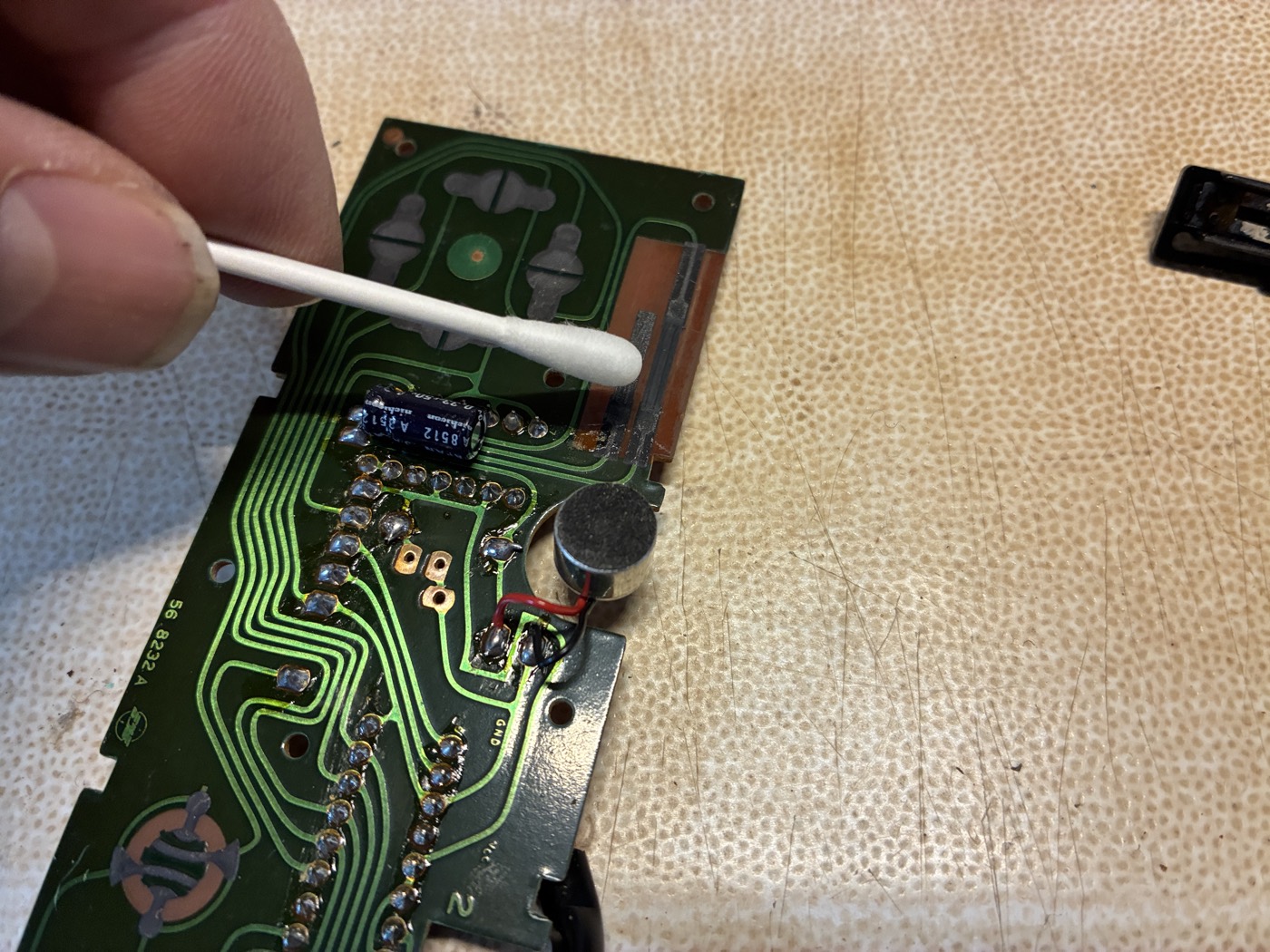
6 Finally I clean the microphone's two lead wires and their solder pads with a little ethanol on a cotton swab. Reassembled, the controller goes quiet.
None of this is difficult. It only asks for a steady hand, and the patience to meet a forty-year-old switch on its own terms.
— Taisei Shimizu, Enjoy Game Japan
The console isn't the only thing that gets old
You can clean every contact on the machine and still lose something. Some cartridges keep their own memory — and memory, unlike plastic, has a shelf life.
Carts with a battery inside
A coin-cell soldered to the board is what lets these games remember you. A cell made in the 1980s is decades past its rated life. If a save vanishes overnight, the cart — not the console — is what needs a bench.
Carts that saved to cassette tape
Before batteries, the Famicom Data Recorder wrote your work to audio tape. These two let you build something — a track, a stage — and the Japanese machine could actually keep it.
A machine that runs today was once examined, cleaned, and properly powered by someone who took the time. That time is not visible in a listing photograph. It is visible in how the machine behaves — and in whether the person selling it can speak to what was actually done.
If you're looking for a console that has already had this care, take a look at what we have in the shop.